
What Is Keyword Cannibalization and How to Fix It
- September 2, 2026
- Devavratha
- No Responses
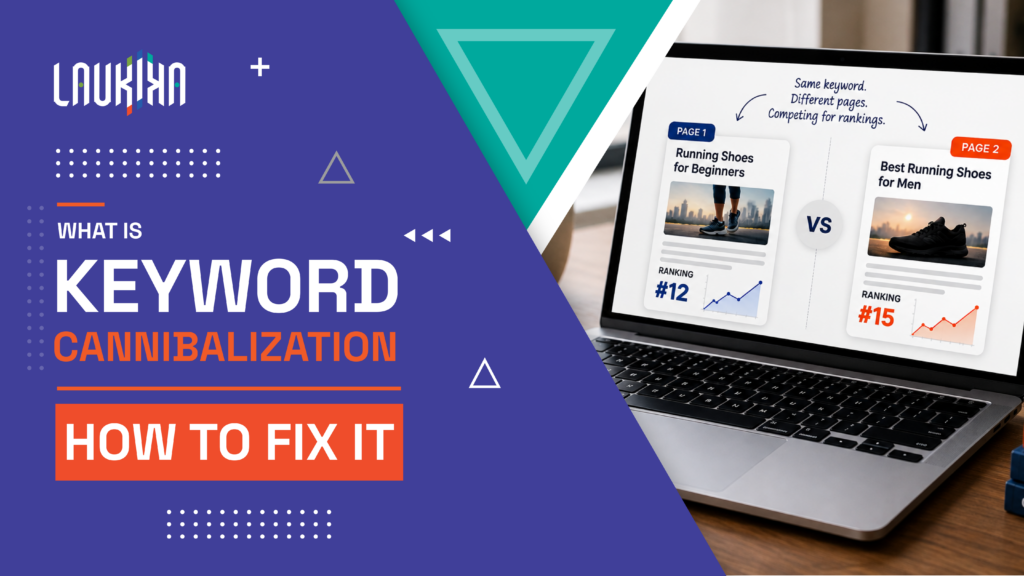
When multiple pages on the same website target similar search terms, keyword cannibalization can quietly create problems for your SEO performance. At first, publishing several articles around the same topic may seem like a smart way to cover more searches. But if those pages serve the same intent, they can end up competing with one another instead of strengthening your website’s visibility.
This doesn’t necessarily mean Google will penalise your website. The bigger issue is that search engines may struggle to decide which page is the best result for a particular query. As a result, rankings can shift between pages, the wrong URL may appear in search results, and the authority you’ve built around a topic can become spread across multiple pages. This can also make it harder to track which content is actually performing well.
The good news is that you can usually resolve these issues without starting from scratch. By finding pages with overlapping intent, deciding which URL should be the primary resource and adjusting your content and internal links, you can give each page a clearer role. A well-planned approach helps your content work together rather than compete for the same space in search results.
What Is Keyword Cannibalization and What Does It Actually Mean
What is keyword cannibalization? It happens when two or more pages on the same website target the same or very similar search queries and compete for the same search intent. Keyword cannibalization meaning, in simple terms, is that your own pages are competing with each other instead of working together to strengthen your visibility for a topic.
This usually happens when a website publishes several pieces of content around a similar subject without clearly defining what each page is meant to rank for. For example, a business might have separate pages targeting “SEO services,” “SEO agency” and “best SEO services” even though all three pages offer almost identical information and target the same audience. Search engines may then struggle to decide which page is the most relevant result.
It’s important to understand that having multiple pages mention the same keyword doesn’t automatically mean you have a cannibalization problem. A website can have several pages targeting related terms when each one serves a different search intent. For instance, an informational guide and a service page can target related keywords without necessarily competing.
The real issue is overlapping intent. If two pages answer the same question, target the same audience and are trying to rank for the same search, they may be competing for visibility. Identifying that overlap is the first step towards deciding whether you should consolidate, differentiate or redirect one of the pages.
Keyword Cannibalization Meaning
The keyword cannibalization meaning is simple, two or more pages on your website compete for the same or very similar search intent. Instead of one strong page ranking, your visibility and authority can become split across multiple URLs.
What Is Keyword Cannibalization in SEO
What is keyword cannibalization in SEO? It occurs when multiple pages target overlapping keywords and serve similar purposes in search results. This can make it harder for Google to determine which page should rank for the query.
The Three Signals Google Sends
When pages overlap, Google may rotate which URL appears, rank a less relevant page or show none of the competing pages consistently. These changes can be signs that your content has overlapping search intent.
Why It Is More Common Than Most Teams Realize
Cannibalization often develops naturally as websites grow. New writers may cover existing topics without knowing what has already been published, while older content can gradually become too similar after multiple updates.
Real Keyword Cannibalization Examples That Show What Goes Wrong
Looking at keyword cannibalization examples makes the issue easier to spot. It often develops naturally as a website grows — new articles get published, similar keywords are targeted, or older content is updated without checking what already exists. For example, an SEO company might have separate articles such as “What Is SEO?”, “How SEO Works” and “Why SEO Is Important.” If all three cover similar information and target the same search intent, they may end up competing for visibility instead of helping one page build stronger authority.
The same problem can appear on commercial and e-commerce websites. Pages targeting “SEO agency in Bangalore,” “Bangalore SEO agency” and “best SEO agency in Bangalore” may compete if they offer the same service and target the same audience. Similarly, a “running shoes” category page, a “best running shoes” blog and a product collection could overlap if their purpose is too similar. Content updates can create the same issue when a new article covers a topic that an older page already ranks for.
However, simply having the same keyword across multiple pages doesn’t mean you have a cannibalization problem. What matters is search intent. If each page serves a clearly different purpose — such as educating, selling or helping users compare options — they can often rank alongside each other. The real issue begins when multiple URLs are trying to satisfy the same search need.
Blog Post vs Blog Post Targeting the Same Keyword
Two blog posts can compete when they target the same keyword and answer nearly the same question. For example, “How to Improve SEO” and “Ways to Improve SEO” may split visibility instead of strengthening one page.
Product Page vs Blog Post Targeting a Commercial Keyword
A product page and blog can overlap when both target the same commercial query. A product page for “best running shoes” and a “Best Running Shoes to Buy” article may compete despite having different formats.
Landing Page vs Service Page With Overlapping Keyword
A landing page and service page can compete when they target the same keyword and offer similar information. If their purpose isn’t clearly different, search engines may struggle to decide which URL deserves visibility.
Multiple Location Pages Targeting the Same Keyword
Creating several location pages with nearly identical content can lead to unnecessary competition. For example, multiple pages targeting “digital marketing agency in Bangalore” need distinct, useful information rather than simply repeating the same keyword across URLs.
How to Identify Keyword Cannibalization Before It Damages Your Rankings
Knowing how to identify keyword cannibalization means looking beyond whether the same keyword appears on multiple pages. The real concern is whether two or more URLs are competing for the same search intent. Start by checking which pages rank for your important queries and watch for patterns such as Google switching between different URLs for the same keyword. Compare those pages closely — do they answer the same question, target the same audience or offer similar information? If they do, there may be genuine overlap worth addressing.
Your SEO and analytics data can provide further clues. Look for multiple pages receiving impressions or clicks for the same queries, inconsistent rankings or traffic shifting between URLs. It’s also worth reviewing your internal links to see whether similar anchor text points to different pages, which could create mixed signals about your preferred resource. However, don’t rely on one metric alone. Consider search intent, content overlap, rankings, traffic and page purpose together before deciding whether to merge, redirect, reoptimise or leave the pages as they are.
Method 1: Google Site Search for Your Target Keyword
A quick way to spot potential overlap is to search Google using site:yourdomain.com followed by your target keyword. Review the pages that appear and compare their topics, titles and search intent. If several URLs seem to answer the same query, take a closer look at whether they are competing for the same audience and purpose.
Method 2: Google Search Console Pages Report
Google Search Console can help you see which pages are receiving impressions and clicks for your target queries. Compare the URLs appearing for the same keyword and look for unusual patterns. If multiple pages are getting visibility for one query, review their content and intent before deciding whether you have genuine cannibalization.
Method 3: Keyword Tracking Tools for Rank Swapping Patterns
Rank tracking tools can reveal when different pages from your website keep switching positions for the same keyword. This pattern, sometimes called rank swapping, can be a useful warning sign. Track important keywords over time rather than relying on a single snapshot, then compare the competing URLs to understand why Google may be changing its preference.
Method 4: Build a Content Inventory and Keyword Map
Create a simple inventory of your existing pages, their primary keywords, search intent and current rankings. Mapping this information in one place makes overlapping topics much easier to spot. If several pages are targeting the same keyword or intent, you can decide whether to combine them, differentiate their purpose or adjust their targeting.
Keyword Cannibalization Checker and Tool Comparison for 2026
Finding content overlap becomes much easier when you have the right data to work with. A keyword cannibalization checker can help you spot multiple pages appearing for the same search terms, while a keyword cannibalization tool can reveal ranking changes, competing URLs and patterns that may be difficult to catch manually. For smaller websites, Google Search Console can be a useful starting point, while larger websites may benefit from platforms such as Semrush, Ahrefs or SE Ranking that make it easier to monitor multiple URLs at scale.
However, no tool can decide on its own whether two pages are genuinely competing. Ranking for the same keyword doesn’t automatically mean there’s a problem, especially when the pages serve different search intents. Use the data to identify potential overlaps, then review the pages themselves. Compare their content, purpose, rankings, traffic and the search result they appear in. If two URLs are clearly targeting the same audience and answering the same need, you can then decide whether to consolidate the content, differentiate their focus or redirect one of the pages.
Google Search Console (Free)
Google Search Console is a practical starting point for finding potential keyword overlap without paying for an SEO platform. Its Performance report lets you compare queries, pages, clicks and impressions, helping you spot multiple URLs appearing for similar searches. It works best when you want to investigate a smaller website manually.
Best For: Basic analysis and smaller websites.
Semrush Cannibalization Report (Paid)
Semrush makes it easier to spot pages that may be competing for the same keywords. Its Position Tracking data can help identify multiple URLs ranking for one keyword and changes in their positions over time. This makes it useful for SEO teams managing larger websites and monitoring ranking fluctuations regularly.
Best For: Large websites and ongoing rank tracking.
Ahrefs Site Explorer (Paid)
Ahrefs Site Explorer can help you investigate which pages are ranking for your target keywords and compare their organic performance. By reviewing ranking keywords and URLs, you can identify pages that may have overlapping visibility. It’s particularly useful when you want to combine cannibalization checks with broader competitor and backlink research.
Best For: Detailed keyword and competitor analysis.
Screaming Frog SEO Spider (Free up to 500 URLs)
Screaming Frog approaches the problem from a technical angle. Its crawler helps you examine page titles, headings, internal links, URLs and other on-page elements across your site. While it doesn’t automatically diagnose every cannibalization issue, running a proper technical SEO crawl can reveal pages with similar targeting or content that deserve a closer review
Best For: Technical audits and content inventories..
| Tool | Cost | Cannibalization Feature | Best For |
|---|---|---|---|
| Google Search Console | Free | Pages tab per query | All sites, ongoing monitoring |
| Semrush Position Tracking | Paid | Dedicated cannibalization report | Large keyword sets |
| Ahrefs Site Explorer | Paid | Multi-URL keyword filtering |
Full domain analysis |
| Screaming Frog | Free / Paid | Duplicate content crawl | Technical page-level audits |
| Ubersuggest Site Audit | Free / Paid | Duplicate keyword flagging | Beginners and small sites |
How to Fix Keyword Cannibalization Step by Step
Knowing how to fix keyword cannibalization starts with understanding that not every case of keyword overlap needs fixing. The real issue is when multiple pages target the same search intent and compete for visibility. Before changing anything, compare the pages’ keywords, content, rankings, traffic, backlinks and purpose. This will help you decide whether one page should take priority or whether both can remain with clearer roles. In some cases, combining similar content into one stronger resource makes sense. In others, the better option is to differentiate the pages by giving each one a distinct topic, keyword focus or search intent.
Once you know what is causing the overlap, choose the solution that best fits the pages involved. You may need to consolidate competing content, redirect a weaker URL or rework a secondary page so it serves a different purpose. Internal links can also reinforce the relationship between related pages and point users towards the resource you want to prioritise. Canonical tags may be useful when similar versions of a page need to remain accessible, but they shouldn’t be used as a quick fix for every situation. After making changes, give search engines time to recrawl the pages and monitor rankings, impressions, clicks and the URLs appearing for your target queries. The goal isn’t simply to remove competing pages — it’s to make sure every important URL has a clear purpose and contributes to a stronger, more organised website.
Identify the Cannibalising Pages and Pick a Winner
Start by finding the pages that are competing for the same keyword or search intent. Look at their rankings, organic traffic, backlinks, content quality and relevance to the query. From there, choose the page that has the strongest potential to rank and provides the most useful answer. This becomes your primary page, while the others can be merged, redirected or reworked depending on their value. Taking this step first helps you avoid making changes without knowing which page deserves to lead.
Consolidate and Merge Competing Content
When two pages cover almost the same topic, merging them can create a stronger, more useful resource. Bring the best information from both pages into one well-structured piece, remove repetition and make sure the final version fully matches the search intent. This gives search engines one clear page to rank instead of several similar options.
Set Up 301 Redirects From Weaker URLs
If a weaker page no longer serves a unique purpose, consider redirecting it to the stronger, more relevant page. A 301 redirect helps send users and search engines to the preferred URL. Before doing this, check the old page for valuable traffic, backlinks or conversions. Only redirect when the new destination genuinely meets the same search intent.
Reoptimise Secondary Pages for Different Keywords
Some pages may be worth keeping but need a clearer purpose. Instead of removing them, adjust their content, headings and keyword focus to target a different search intent. For example, one page could answer an informational query while another focuses on a commercial need. This allows both pages to rank without competing for exactly the same search.
Apply Canonical Tags Where Necessary
Canonical tags can help indicate your preferred URL when similar or duplicate versions of a page need to remain accessible. They can be useful in specific situations, but they shouldn’t be treated as a universal fix for cannibalization. If two pages have different purposes, it’s usually better to clarify their content and targeting instead.
Update Internal Links to Reinforce the Primary Page
Once you’ve selected your primary page, review the internal links pointing to the competing URLs. Where appropriate, update them to point towards the preferred page and use natural, descriptive anchor text. Following a clear internal linking strategy creates a clearer path for visitors and helps reinforce the relationship between your supporting content and the page you want to prioritise.
How to Avoid Keyword Cannibalization Before It Starts
Knowing how to avoid keyword cannibalization starts before you create a new page. As your website grows, similar topics can easily overlap, especially when multiple writers are publishing content or keyword research is handled separately for each article. A simple content planning process can prevent this. Before targeting a new keyword, check your existing pages, review their search intent and decide whether you genuinely need another URL. Maintaining a clear keyword map with each page’s primary keyword, intent, URL and content type makes these overlaps much easier to spot.
It’s also important to give every page a clear purpose. Related pages can target similar topics when they answer different questions or serve different audiences, but creating separate pages for minor keyword variations can lead to unnecessary competition. Keep your content inventory updated, use internal links to show how related pages connect and review existing content before publishing something new. Sometimes, updating or expanding an existing page is more valuable than creating another one. With clear topic boundaries, defined search intent and regular content reviews, your pages can support each other instead of competing for the same search results.
Build and Maintain a Keyword Map
A keyword map gives every important page a clear target. Record the primary keyword, search intent, URL and content type for each page, then update it as your website grows. Before targeting a new keyword, check the map first. It makes overlapping topics easier to spot and helps your content team avoid creating pages that compete with existing ones.
Do a Site Search Before Publishing Any New Page
Before publishing a new page, search your website for the target keyword and closely related terms. Look at the pages already covering the topic and compare their purpose and search intent. If an existing page already answers the same query, consider updating it instead of creating another URL that could compete for the same visibility.
Use a Topic Cluster Model for Your Content Strategy
Organise related content around a central topic instead of treating every keyword as a separate content opportunity. A strong pillar page can cover the broader subject while supporting articles focus on specific questions or subtopics. This approach gives each page a distinct role and creates a more organised content structure as your website grows.
Run a Quarterly Keyword Cannibalization Audit
Content changes quickly, and pages that were once clearly differentiated can start overlapping over time. A quarterly SEO audit helps you catch these issues early. Review ranking URLs, target keywords, search intent and traffic patterns to identify pages that may be competing. You can then merge, redirect, reoptimise or leave them as they are based on the findings.
Keyword Cannibalization and AI Search in 2026: What You Need to Know
AI-powered search is getting better at understanding context, meaning and relationships between content, making a clear website structure more important than ever. As part of a broader generative engine optimization approach, keyword cannibalization can become a concern when multiple pages target the same topic and search intent without offering enough difference. The goal isn’t to avoid related content, but to give each page a clear purpose, connect relevant pages through internal links and avoid creating separate pages for minor keyword variations. A well-structured website with useful content and distinct search intent is easier for both users and search systems to understand.
How Keyword Cannibalization Affects AI Overview Citations
Having multiple pages covering the same search intent doesn’t automatically prevent your content from appearing in AI Overviews. However, overlapping pages can make it harder to establish which resource best represents your expertise on a topic.
A clearer content structure gives search systems stronger context about the purpose of each page. Rather than creating several similar articles, focus on distinct, useful resources that work together and make the most relevant page easy to identify.
How AI Search Engines Evaluate Page Authority for a Topic
AI search systems look beyond a single keyword when understanding whether a page is useful for a topic. They can consider factors such as relevance, content quality, credibility, context and how information connects across a website.
A page supported by related, well-organised content can provide stronger topical context. However, there is no single internal linking pattern or authority score that guarantees visibility in AI-generated search results.
Steps to Fix Keyword Cannibalization for AI Search Visibility
Start by identifying pages that target the same search intent and decide which one provides the strongest answer. Where appropriate, merge overlapping content or redirect weaker URLs. For pages worth keeping, give each one a distinct purpose and keyword focus.
Strengthen relevant internal links and make the primary resource clear. Finally, monitor rankings and search visibility over time to see whether the changes have improved content clarity.
Frequently Asked Questions
What is keyword cannibalization?
Keyword cannibalization happens when multiple pages on your website target the same or very similar search intent, causing them to compete for visibility.
What is keyword cannibalization in SEO and how does it affect rankings?
What are the most common keyword cannibalization examples?
How do I identify keyword cannibalization on my website?
What is the best keyword cannibalization checker to use in 2026?
Which keyword cannibalization tool gives the most accurate results?
How do I fix keyword cannibalization without losing rankings?
How do I avoid keyword cannibalization when creating new content?
Conclusion
As your website grows, content overlap can happen more easily than you might expect. Keyword cannibalization isn’t always a sign that something has gone seriously wrong, but it can make it harder for search engines to understand which page should rank for a particular query. The key is to give every important page a clear purpose, target a distinct search intent and make sure related content supports rather than competes with it.
Regular content audits, a well-maintained keyword map and thoughtful internal linking can help you catch potential issues before they affect performance. When overlap does occur, you don’t always need to delete content. Depending on the situation, you can merge pages, redirect weaker URLs, rework their focus or simply clarify their roles.
Recent Blogs
Top 15 Mistakes in SEO Friendly Website Design
A website can look professional and still struggle to attract visitors from Google. The problem may not be the content

The AI Search Visibility Mistake Most Brands Overlook
A brand can rank well on Google, attract organic traffic and still remain absent when potential customers ask AI platforms