
What is Schema Markup in SEO – Types & Their Implementation
- April 29, 2026
- Devavratha
- No Responses
Schema markup sits quietly in your page code and gives search engines clearer cues about what they’re looking at. It uses a standardized format to define elements like products, articles, and businesses more clearly.
Search engines don’t really “read” content the way humans do. They interpret, guess, and connect signals. Sometimes they get it right. Many times, not quite.
That’s where things start to shift.
If you’ve been trying to understand what is schema markup, think of it as a way of removing that guesswork. It tells search engines exactly what your content represents. Not just text, but meaning. And that small shift, in most cases, changes how your page appears, gets understood, and eventually gets clicked.
What is Schema Markup?
Most pages already contain all the information search engines need. The issue is interpretation. Schema markup steps in here by structuring that information in a way machines don’t have to guess.
Instead of trying to “figure out” whether something is a product, article, or event, search engines are told directly. The content stays the same. The clarity changes.
This system uses a shared framework from Schema.org, which essentially standardises how different types of information are labelled across websites. So when one site marks something as a “Product,” it means the same thing everywhere else. This also answers a common confusion around what is structured data in SEO and the schema markup definition. Structured data is the broader idea. Schema markup is how you actually implement it.
What does this actually translate to in practice?
A product page doesn’t just look like one - it’s identified as one
Pricing, ratings, and availability are clearly defined, not implied
Author names and publish dates stop being loose text
Events get recognised as events, not just paragraphs with dates
Search engines spend less time guessing, more time indexing correctly
How Does Schema Markup Work?
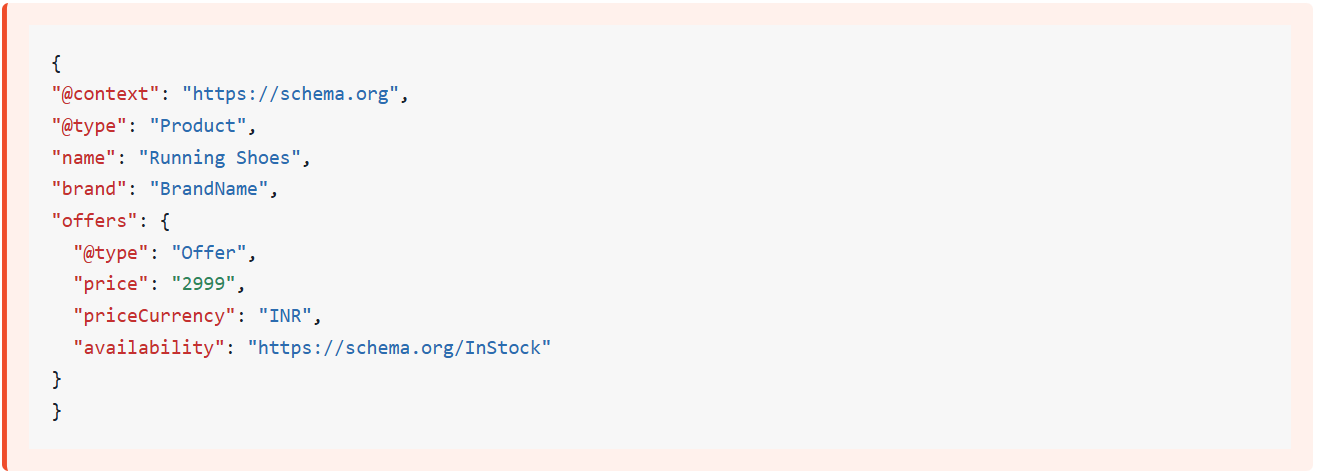
Most websites use schema markup through JSON-LD, which sits quietly in the page code and communicates directly with search engines. Users don’t see it. Crawlers do.
This is also where structured data vs schema markup becomes clearer. One is the format. The other is the language used inside that format.
Here’s what actually happens behind the scenes:
Search engines crawl your page as usual
They detect structured data embedded in the code
Schema defines the entity - say, a Product or Article
Properties add detail - price, rating, author, availability
The data is validated against standard formats
And this is where things go a step further. It doesn’t instantly boost your page or push it up rankings. What it really does is give Google a clearer read of where your content fits.
And that changes a few things quietly in the background.
- Your page is understood with more precision, not just broadly categorised
- Specific details like price or publish date are picked up more reliably
- It can qualify for formats beyond the usual blue link results
- Sometimes, parts of your content get pulled into richer search displays
- In certain cases, it even gets tied to known entities like brands or products
This doesn’t guarantee anything shows up differently. But it opens that door. Not guaranteed. But definitely enabled.
Schema Markup Formats - JSON-LD vs Microdata vs RDFa
| Key Aspects |
JSON-LD |
Microdata |
RDFa |
|---|---|---|---|
|
Implementation method |
Script-based, separate from HTML |
Embedded within HTML tags |
Embedded with extended attributes |
|
Google’s recommendation |
Strongly recommended |
Supported |
Supported but less common |
|
Ease of implementation |
Easy, clean separation |
Moderate effort |
More complex |
|
Placement in HTML |
<script> in head or body |
Inline within elements |
Inline with attributes |
|
Maintenance effort |
Low |
Medium |
High |
Why is Schema Markup Important for SEO?
This is where schema starts to show its value.
Search results are no longer just blue links. They’re layered with additional context. Ratings, FAQs, product details. All of that comes from structured data.
Here’s why schema matters more than it seems:
It improves how search engines interpret your content
Most pages rely on Google to “figure things out” from headings and text. That usually works, but not always cleanly. Schema removes some of that guesswork. It tells the system what’s what, instead of hoping it connects the dots correctly.
It enables rich snippets like ratings, pricing, FAQs
Those extra details you sometimes see in search results don’t just appear on their own. They’re pulled from structured data. No schema, and in most cases, those enhancements don’t show up at all.
It increases click-through rates by making listings stand out
When two results look similar, people tend to click the one that feels more complete. A visible rating or price does that. It’s a small visual difference, but it changes behaviour more often than expected.
It supports voice search and AI-driven queries
Voice results are usually direct answers, not links. For that, search systems need clean, structured inputs. Schema makes your content easier to extract from, especially when the query is conversational.
It reduces misinterpretation of content intent
Sometimes a page covers multiple angles, and that can confuse indexing. Schema helps anchor the main purpose. Not perfectly, but enough to reduce mixed signals.
This sounds obvious. It usually isn’t.
Most websites still skip this layer entirely.
Types of Schema Markup
Article Schema:
Used mostly for blogs and editorial content, where context like authorship and publishing date matters more than people realise. Key details usually include the headline, author name, publish date, and main image. In search results, this often shows up as a cleaner listing with visible metadata, especially for news or time-sensitive content.
Product Schema:
This is where things get more commercially relevant. Typically applied to product pages, it defines elements like price, stock status, and user ratings. When implemented properly, listings can show pricing and reviews directly in search, which tends to influence clicks more than expected.
Local Business Schema:
Useful for businesses that operate from a physical location. It includes information like address, phone number, and working hours. Search engines then use this to strengthen local listings, especially in map results and nearby searches.
Organization Schema:
Mostly used on brand or company-level pages. It connects your site with details like logo, contact information, and social profiles. This helps build out knowledge panels and improves how your brand appears in search.
Breadcrumb Schema:
More technical, but quite useful.It maps out your site structure — page hierarchy, navigation paths, and positioning. In search results, this replaces messy URLs with cleaner breadcrumb trails, making navigation clearer.
Different use cases. Same underlying purpose - reduce confusion.
How to Implement Schema Markup - Step by Step
Choose the Right Schema Type for Your Page:
Start with intent. What is this page actually trying to represent? A product, an article, a business listing. That decision shapes everything that follows.
Generate Your Schema Code:
You can build it manually or use a generator. Most teams prefer generators for speed, but manual setups give you tighter control over what gets included.
Add the JSON-LD Script Tag to Your Page:
The code sits inside a script tag, usually in the head or body. It doesn’t change how the page looks, which is why it’s relatively easy to implement without design impact.
Validate Your Schema Using Google’s Rich Results Test:
This is where small issues show up. Missing fields, incorrect structure, formatting errors. Better to catch them here than later.
Monitor Performance in Google Search Console:
Over time, this gives you a clearer picture - impressions, clicks, errors, warnings. Not immediate, but useful once data starts building. That feedback loop matters.
This is where most brands get stuck. Not implementation. Consistency.
6 Common Schema Markup Mistakes to Avoid
Even small errors can break structured data. And the frustrating part is, you might not even notice immediately.
Using the wrong schema type:
What goes wrong: What usually happens is simple - Google reads it, then moves on. No warning, no error, just ignored. A product page marked as an article, for example, won’t do much.
What to do: Step back and ask what the page is actually about. Then match it with the closest type on Schema.org. If it feels forced, it probably is.
Missing required properties:
What goes wrong: This one’s a bit deceptive. The markup might still be “valid,” but incomplete. So technically fine, practically useless. No rich results, no enhancements.
What to do: Run it through Google Rich Results Test and look at what’s missing. Usually a few key fields make the difference.
Adding misleading information:
What goes wrong: This is where things can backfire. If your schema says one thing and the page shows another, trust drops. Over time, Google just stops relying on it.
What to do: Keep it honest. If the page doesn’t show ratings or pricing, don’t include them in the markup either.
Improper formatting:
What goes wrong: JSON doesn’t tolerate mistakes. One comma out of place and the whole block stops working. The frustrating part? You won’t see it unless you test.
What to do: Validate before and after publishing. It takes a minute and saves a lot of guesswork later. Tools like Google Rich Results Test or JSON validators will catch syntax issues instantly.
Overusing schema everywhere:
What goes wrong: More isn’t always better here. Adding schema to every single page can make things messy without adding real value.
What to do: Focus on pages where extra context actually matters - products, articles, local pages. Skip the rest.
Ignoring updates and changes:
What goes wrong: This part gets overlooked. Schema standards do change, and older setups can quietly become outdated.
What to do: Nothing complex needed — just revisit your markup once in a while and check if anything needs updating. A quick quarterly audit usually helps catch outdated fields.
Frequently Asked Questions
1. What is schema markup in SEO?
It’s a way of adding structured data to your website so search engines don’t have to guess that your content represents. Instead of just reading text, they get clear signals about whether something is a product, article, or business. This usually leads to better interpretation of your page. And in some cases, a more detailed search result.
2. What is the difference between schema markup and structured data?
Structured data is the broader idea. It’s about organising information so machines can read it properly. Schema markup is one way of doing that, using a shared vocabulary from Schema.org. So one is the concept, the other is the implementation.
3. What is Schema.org and why does it matter?
4. What are rich snippets and how does schema enable them?
5. Does schema markup directly improve Google rankings?
6. Which schema format does Google recommend - JSON-LD, Microdata, or RDFa?
7. How do I know if my schema markup is working correctly?
Conclusion
Schema markup sits quietly in your code, but its impact shows up where it matters – search results.
Once you understand what is schema markup, it stops feeling like a technical add-on and starts looking like a visibility layer. Something that helps your content stand out, not just exist.
And in most cases, that’s the difference.
Recent Blogs

How Branding and Digital Storytelling Build Strong Entertainment Brands
The entertainment landscape has never been more crowded. With OTT platforms, streaming services, television, social media and short-form video all

Short Stories. Big Impact. How Micro-Series Are Changing OTT Entertainment in India
India’s entertainment landscape is changing rapidly – audiences have access to more films, shows, series, and digital content than ever